Construction Delay Analysis Power BI: 7 Proven Steps + Case Study
Construction projects don’t collapse overnight. They bleed — slowly, painfully, and expensively — through a thousand small delays.
It starts with a schedule slip on a critical activity, a handful of RFIs that sit unanswered too long, or a subcontractor who misses a milestone by a week. Multiply those by dozens of projects, and suddenly an executive review turns into a claims battlefield.
According to McKinsey, large construction projects typically take 20% longer to finish than scheduled and can run up to 80% over budget (McKinsey Productivity Report). In the U.S. alone, delay disputes cost the industry billions each year — Arcadis’ 2023 Global Construction Disputes Report found the average dispute value was $42 million, with an average resolution time of 15.4 months (Arcadis). This is why construction delay analysis Power BI dashboards are becoming essential — they give executives real-time clarity into claims, responsibilities, and risks.
Think about that: a year and a half of burned cash, lawyer fees, and damaged reputations before you even know if you’ll recover. For many contractors, one unresolved dispute can wipe out the profit of an entire portfolio.
The hidden cost of poor delay analysis is staggering:
-
Lost margins as project overhead piles up.
-
Frozen working capital because unsettled claims tie up millions.
-
Strained relationships between owners, GCs, and subs, making future bids harder to win.
-
Reputational damage when a firm becomes “that contractor” known for disputes.
And yet, most executives we meet still rely on Excel trackers buried in SharePoint, weekly PDFs emailed by project managers, and siloed schedule files in Primavera P6. By the time those numbers make it to the boardroom, the damage is already done.
Here’s the truth: You can’t solve project delays with yesterday’s reporting methods. You can’t afford to wait weeks for analysts to reconcile logs manually. You need to know today — in real time — where claims are growing, who is responsible, and how much is at risk.
But the problem isn’t just technology. It’s alignment. Dashboards without strategy are just expensive toys. The firms that succeed are those that start with business goals, map clear KPIs, assign ownership, and connect data across project controls, finance, and operations.
This guide is your roadmap. We’ll show you:
-
How to align your KPIs with executive questions.
-
How to use in-house Microsoft 365 tools and Power BI to stand up a low-cost proof of concept.
-
How to integrate fragmented data from P6, Procore, Sage, and SharePoint into a single source of truth.
-
And most importantly, how one contractor transformed their dispute process with a four-tab Power BI Claims Dashboard, cutting resolution times from 120 to 75 days. You can see the full methodology, four-tab dashboard design, and verified results in our construction claims Power BI case study — including the KPI ownership map and 10-week implementation roadmap.
If your projects are running on outdated spreadsheets and gut instinct, you’re already paying the price — you just don’t see it yet.
1. Construction Delay Analysis Power BI: Start With Business Goals
Executives often make the mistake of starting with the tool (Power BI, Tableau, etc.) before clarifying their goals. This is like buying heavy machinery before finalizing the project drawings. Business questions must lead the way.
At the executive level, common goals include:
- Reducing the volume and cost of claims
- Shortening average resolution time
- Increasing accountability among subcontractors, GCs, and owners
- Protecting margins by resolving disputes earlier
- Improving visibility into project-level risks
This is the starting point we used on this exact engagement — our Decision-First BI Framework™ requires the business outcome to be defined before a single visual is designed.
2. Defining KPIs, Owners, and Business Questions
Dashboards should cascade by role. Executives ask strategic questions, managers track project trends, and analysts dig into claim-level details. This requires a structured KPI map. Every KPI should have a definition, owner, data source, refresh cadence, and business question.
| KPI | Definition | Owner | Data Source | Refresh |
| Total Claims | Number of claims filed, split Pending vs Settled | Project Controls Lead | Procore Claims / Excel | Weekly |
| Total Claims Amount | Dollar value of all claims, split Pending vs Settled | Finance Manager | ERP (Sage 300, Viewpoint) | Weekly |
| Average Resolution Time | Average days taken to resolve claims | Risk Manager | Claims Log + Schedule Data | Monthly |
| Responsibility Breakdown | Proportion of delays caused by Sub, GC, Owner | Claims Analyst | Primavera + Procore | Weekly |
These metrics form the foundation of any construction delay analysis Power BI solution, ensuring executives and managers are aligned.
3. Typical Data Sources in Construction
Most construction companies already have the data, but it lives in silos.
Common sources include:
- Scheduling: Primavera P6, Microsoft Project
- Project Management: Procore, Autodesk Build, Oracle Unifier
- ERP/Finance: Sage 300 CRE, Viewpoint Vista, QuickBooks
- Collaboration: SharePoint, OneDrive, Email
- Field Logs: RFIs, Submittals, T&M tickets
- External: NOAA weather feeds, drone imagery, GPS on equipment
Integrating these sources into a single construction delay analysis Power BI dashboard eliminates silos and provides a single source of truth.
4. Challenges of Integration
The pain of integration is what blocks most contractors from achieving a unified view. Challenges include multiple calendars in schedules, inconsistent WBS codes, uncontrolled Excel versions, and data ownership issues.
Solutions with Microsoft 365 stack:
- Use Power Query in Excel for pilots
- SharePoint/OneDrive as staging areas
- Power Automate for file ingestion and standardization
- Azure SQL (serverless) for building a dimensional star schema once ROI is proven
Many firms fail here — but a staged approach proves construction delay analysis Power BI dashboards can work even with fragmented systems.
5. Proof of Concept and ROI
We recommend starting with a proof of concept (POC) using existing tools. For instance, combine claim logs from Procore with schedule updates from P6 into a Power BI dashboard. Even this limited integration saves dozens of hours each month. ROI is measured both in reduced manual preparation time and in reduced disputes.
Example ROI calculation:
- 10 project managers save 4 hours per week = 40 hours saved
- At $60/hour = $2,400 per week, ~$125,000 annually
- Power BI Pro licenses + Azure SQL serverless = <$10,000 annually
Result: over 10x ROI proven in pilot
Even a limited construction delay analysis Power BI pilot shows measurable ROI in time savings and fewer disputes.
6. Construction Delay Analysis Power BI Case Study: Reducing Claim Cycle Time
Challenge:
A mid-sized contractor faced mounting disputes with owners. Claim logs were kept in Excel, schedules in P6, and costs in Sage 300. Executives had no single view of outstanding exposure.
Solution:
We designed a four-tab Power BI Delay Claims Dashboard tailored to executives, managers, analysts, and owners’ reps:
Claims Insights Overview
– KPI cards: Total Claims (Pending vs Settled), Total Claims Amount (Pending vs Settled), Average Resolution Time, 6-Month Resolution Trend.
– Visuals: Claims by Type (bar), Claims by Status (donut), Claims by Location (map with bubble size by $).

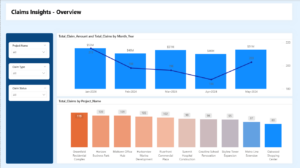
Claims Trends
– Filters: Project, Claim Type, Claim Status.
– Visuals: Claims Amount and Volume by Month (bar + line), Total Claims by Project (table).
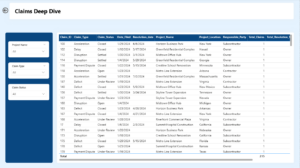
Claims Deep Dive
– Drill through Table: Claim ID, Type, Status, Filed Date, Resolution Date, Project, Location, Responsible Party, Claim Amount, Age.
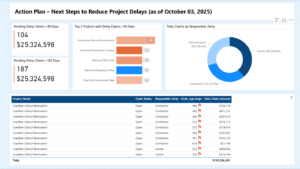
Action Plan
– KPI cards: Pending >90 days (count + $), Pending >120 days (count + $).
– Visuals: Top 5 Projects >90 days (bar), Claims by Responsible Party (donut), Table with Project, Status, Responsible, Age, Amount.
Impact:
– 80% faster report preparation
– Resolution time dropped from 120 to 75 days
– Subcontractors accounted for 42% of unresolved claims, guiding negotiations
– Executives monitored >90-day and >120-day claims in real time
The full case study page walks through every layer of this dashboard — the persona mapping, KPI ownership table, four-tab design, and the before/after results. Read the construction claims case study →
Lessons Learned:
– Dashboards must cascade by role
– Responsibility breakdowns enable constructive negotiation
– Automating one Excel report can unlock adoption momentum
This contractor’s success shows that a construction delay analysis Power BI strategy must cascade by role to succeed.
7. Key Takeaways
– Start with business goals and executive questions
– Map KPIs with owners and sources
– Use M365 stack for low-cost pilots
– Measure ROI early with hours saved and disputes avoided
– Scale once the value is proven
Frequently Asked Questions (FAQ)
What KPIs are most important for construction delay analysis?
Total Claims, Total Claims Amount, Average Resolution Time, and Responsibility Breakdown are essential, supplemented by trend charts by project and by month.
Can Power BI integrate Primavera P6 and Procore data?
Yes, through APIs, ODBC, or intermediate exports (XER, CSV). For POC, export Excel or CSV and land in SharePoint.
How can ROI be demonstrated quickly?
Track hours saved from manual reporting, show reduction in resolution time, and calculate avoided disputes.
How should dashboards be structured?
By role: executives need KPIs, managers need trends, analysts need claim-level detail, and owners’ reps need accountability views.
Implementation Roadmap
| Week 1–2 | Week 3–5 | Week 6–8 | Week 9–10 | |
| Tasks |
|
|
|
|
| Deliverables |
|
|
|
|
| Value |
|
|
|
|
Ready to move from spreadsheets to decision-ready construction analytics? Start with a free Power BI Precision Audit™ — we’ll map your current reporting environment and show you exactly what a claims dashboard would change for your executive team. Or read the full construction case study to see the methodology and verified results first.
Useful Resources:
– Microsoft Power BI
– Procore Construction Software
– Primavera P6 by Oracle
– McKinsey on Construction Productivity